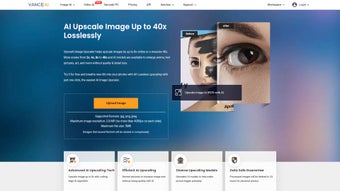

Download VanceAI Image Upscaler – Free AI-Powered Image Enhancement Tool for Windows, Mac, Android & iOS
Transform your low-resolution images into stunning high-quality visuals with VanceAI Image Upscaler, a cutting-edge AI-powered software that enhances image resolution up to 40x without losing detail. Whether you're an e-commerce seller, digital artist, or photography enthusiast, VanceAI delivers professional-grade results with just a few clicks. The tool uses advanced neural networks to intelligently reconstruct textures, sharp edges, and fine details, making it ideal for enlarging anime art, scanned documents, product photos, and more.
Available as both a secure web app and a downloadable desktop application for Windows, Mac, Android, and iOS, VanceAI ensures flexibility and privacy. All uploaded images are automatically deleted within 24 hours, so your data stays safe. With intuitive controls, batch processing, and real-time previews, VanceAI Image Upscaler is the ultimate solution for anyone looking to boost image clarity and quality effortlessly.
Key Features of VanceAI Image Upscaler
One of the standout aspects of VanceAI Image Upscaler is its powerful AI-driven enhancement engine, which leverages deep learning models trained on millions of images to deliver natural-looking results. Unlike traditional upscaling tools that simply stretch pixels and create blurry or pixelated outcomes, VanceAI intelligently predicts missing details based on patterns it has learned. This means that when you upscale a low-res photo, the AI doesn’t just enlarge it—it reconstructs the image with sharper edges, improved textures, and reduced noise. Whether you're working with a faded family photo, a low-quality product shot, or intricate digital artwork, VanceAI maintains the original character while boosting resolution.
The software supports upscaling up to 40x in its downloadable version, a significant advantage over most online tools that cap at 8x. This makes it perfect for professionals who need to print large-format images or digitize old photographs. The web app version offers a convenient 8x maximum, ideal for quick fixes and on-the-go use. Another major feature is the ability to handle various image types with precision: text-heavy images, anime illustrations, and complex artwork are all enhanced without distortion or blurring. The tool also includes a batch processing mode, allowing users to upsize multiple files at once, saving valuable time during large-scale projects.
Privacy is a top priority with VanceAI. All images uploaded to the web version are automatically deleted after 24 hours, ensuring no data remains on their servers. For users who prefer offline processing, the desktop app provides full control over file handling and eliminates internet dependency. The interface is clean and user-friendly, with real-time previews so you can compare original and enhanced versions instantly. With support for popular formats like JPEG, PNG, and WebP, VanceAI Image Upscaler is built for real-world use across personal and professional workflows.
How to Install and Use VanceAI Image Upscaler
Getting started with VanceAI Image Upscaler is simple and fast, whether you choose the web app or the downloadable desktop software. For the online version, simply visit the official VanceAI website, click on “Image Upscaler,” and drag your image file into the upload zone. You can also click to browse your device. Once uploaded, select your desired upscaling factor—up to 8x for the web version—and click “Enhance.” The AI processes the image in seconds, and you can preview the result before downloading it. This method is perfect for quick edits and users who prefer not to install software.
If you're looking for more control and higher upscaling capabilities, download the desktop version for Windows or Mac. The installation process is straightforward: download the installer from the official site, run the file, and follow the on-screen instructions. Once installed, launch the app and import your image using the “Open” button or drag-and-drop functionality.
From there, choose your upscaling level—up to 40x—and select the enhancement mode based on your image type (e.g., “Photo,” “Art,” “Text”). The app will process the image and display the enhanced version in real time. You can then save the result directly to your preferred folder or export it in your desired format.
For users working on multiple files, the batch processing feature is a game-changer. Simply add several images to the queue, set a uniform upscaling factor, and let the software run. This is especially useful for e-commerce stores that need to upgrade hundreds of product images at once.
The app also allows you to adjust sharpening, noise reduction, and contrast settings for fine-tuned results. All changes are non-destructive, meaning the original file remains untouched. With its intuitive layout and minimal learning curve, VanceAI Image Upscaler is accessible to beginners while offering advanced tools for experienced users.
Compatibility & System Requirements
VanceAI Image Upscaler is designed to work seamlessly across a wide range of devices and operating systems, making it one of the most accessible AI image enhancement tools on the market. The web app version is compatible with all modern browsers—including Chrome, Firefox, Safari, and Edge—on both desktop and mobile devices. This means you can enhance images directly from your smartphone or tablet, making it ideal for on-the-go editing. No installation is required, and the tool runs entirely in your browser, ensuring compatibility with virtually any device.
The downloadable desktop applications are available for Windows 10/11 and macOS 10.14 or later, supporting both Intel and Apple Silicon (M1/M2) Macs. This ensures smooth performance and optimized processing speeds across different hardware configurations. The software is lightweight and doesn’t require high-end specifications, so even users with older machines can run it efficiently. Minimum system requirements include 4GB RAM, 500MB of free disk space, and a stable internet connection (required only for initial activation and updates).
For mobile users, VanceAI offers dedicated apps for Android and iOS, available through the Google Play Store and Apple App Store. These mobile versions support upscaling up to 8x and are optimized for touch interfaces. While the mobile app lacks some advanced features like batch processing, it provides excellent results for casual users who need to enhance photos on the go. All versions sync across devices via a free account, allowing you to start editing on your phone and finish on your desktop. Whether you're using a Windows PC, Mac, Android phone, or iPhone, VanceAI Image Upscaler delivers consistent, high-quality results.
Pros and Cons of VanceAI Image Upscaler
- Pro: Exceptional upscaling quality—up to 40x with minimal artifacts
- Pro: AI-powered enhancement preserves fine details and textures
- Pro: Privacy-first approach—images deleted after 24 hours (web version)
- Pro: Supports multiple image types: photos, artwork, text, anime
- Pro: Batch processing for efficient bulk editing
- Pro: Available on Windows, Mac, Android, iOS, and via web
- Con: Free version has limited upscaling (max 8x on web, no batch on mobile)
- Con: Desktop app requires a one-time purchase (not free forever)
- Con: Mobile app lacks advanced features like batch processing
- Con: AI may occasionally over-sharpen or alter colors slightly
- Con: No offline mode for the web version (requires internet)
Frequently Asked Questions (FAQ)
Can I use VanceAI Image Upscaler for free?
Yes. VanceAI offers a free version with basic features, including upscaling up to 8x via the web app and limited access to AI models. However, advanced features like 40x upscaling, batch processing, and enhanced modes require a paid subscription.
How secure is VanceAI Image Upscaler?
Extremely secure. The web version automatically deletes all uploaded images within 24 hours. The desktop app processes files locally, so your data never leaves your device. No third parties have access to your images.
Does VanceAI work with anime and artwork?
Yes. VanceAI is specifically optimized for digital art, anime, and illustrations. Its AI models are trained to preserve delicate lines, color gradients, and fine textures without introducing blur or distortion.
Can I upscale multiple images at once?
Yes. The desktop version supports batch processing, allowing you to upsize dozens of images in a single session. The web app and mobile app do not support batch processing in the free tier.
Is there a mobile app for VanceAI Image Upscaler?
Yes. VanceAI offers dedicated apps for Android and iOS, available on the Google Play Store and Apple App Store. These apps provide upscaling up to 8x and are ideal for quick edits on the go.
Conclusion: Is VanceAI Image Upscaler Worth It?
If you're looking for a powerful, reliable, and privacy-conscious AI tool to enhance your images, VanceAI Image Upscaler is an excellent choice. Its ability to upscale images up to 40x with remarkable clarity sets it apart from competitors. Whether you're a photographer, designer, e-commerce seller, or casual user, the software delivers professional results with minimal effort. The combination of AI intelligence, user-friendly interface, and multi-platform support makes it one of the most versatile image enhancement tools available today.
While the free version has limitations, the paid plans offer exceptional value for users who need advanced features. The desktop app, in particular, is worth the investment for professionals who process images regularly. With secure data handling, real-time previews, and batch processing, VanceAI streamlines your workflow and elevates your visual content.
Ready to transform your low-quality images into stunning high-resolution masterpieces? Download VanceAI Image Upscaler today and experience the future of image enhancement—secure, fast, and free to try!



.png)



